YOUR EVERYDAY DOWNLOAD COMPANION

Good finds.
Yours to keep.

That document. That video. That thing you’ll need later. Turn a link into a file, and keep it all within reach.

Meet Rely

Made for Android · Coming soon on Google Play

A little less searching.
A lot more having it handy.

A PLACE FOR EVERY DOWNLOAD
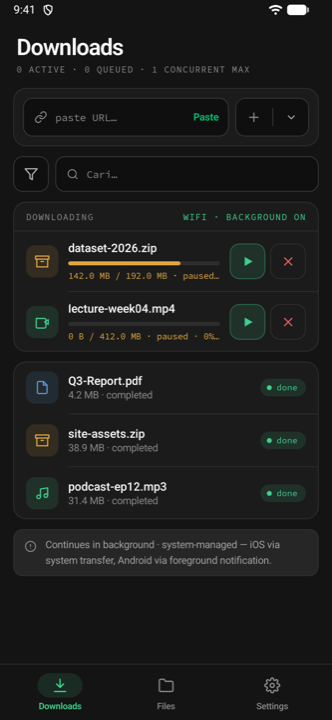
Rely Downloads screen showing a download queue, pause and resume controls, and completed files

Your downloads, in one place.

WHATEVER’S IN YOUR DAY
Documents Videos Audio Images Archives

LESS FRICTION. MORE CONTROL.

A small app.
A useful everyday habit.

Downloads don’t need to be complicated.
Rely keeps the essentials together.

Keep your day moving.

Start a download, then get on with your day. Rely can keep downloading in the background, with progress and controls right in your notification.

RelyDownloading
Your next good find.zip
Within reach.Pause / Cancel

Background availability depends on Android system limits.

A pause, not a setback.

Take a break when you need one. Resume supported downloads with the progress you’ve already made.

Resume support depends on the source server.

Offline. Still in reach.

Browse folders, search saved files, and share what you need. Your downloaded library stays on your device.

YOUR DOWNLOADS, YOUR TERMSWi-Fi onlySpeed limitsAuto-retryLight & dark themes

Some advanced settings require Pro or an in-app boost.

FROM “I NEED THAT” TO “I HAVE THAT”

Three steps.
Then it’s yours.

01 /

Bring a link.

Copy a file URL and paste it into Rely. Add it to your download queue.

02 /

Make it a file.

Follow the progress. Pause, resume, or cancel whenever you need to.

03 /

Keep it handy.

Find it in Files. Organize it, open it offline, or share it with someone.

A FEW GOOD QUESTIONS

Before you
make room.

Ask us something else
What can I download with Rely?

Files available through supported links, including documents, videos, audio, images, and archives. Availability depends on the source. Only download content you have permission to save.

Do downloads continue in the background?

Yes, when background downloads are enabled. Android displays an ongoing notification with progress, Pause, and Cancel controls. Downloads remain subject to device settings, connectivity, and Android time limits.

Can I use my saved files offline?

Yes. Once downloaded, files are stored on your device. You can browse, search, and organize your library without an internet connection. New downloads require a connection.

Why can’t every download be resumed?

The original server needs to support resuming a transfer. When it does, Rely can continue from where you left off. Some sources require the download to start again.

Where can I get the app?

Rely’s Google Play release is in progress. The app isn’t publicly available yet. For release questions, email hi@dwirandyh.dev.

GOOD THINGS, WITHIN REACH

Save it today.
Have it tomorrow.

Your next everyday companion. Coming soon on Android.
Ask about the launch

RELY IN ACTION

A download, on your terms.

Start a download, leave the app, pause, resume, and cancel from the notification.